
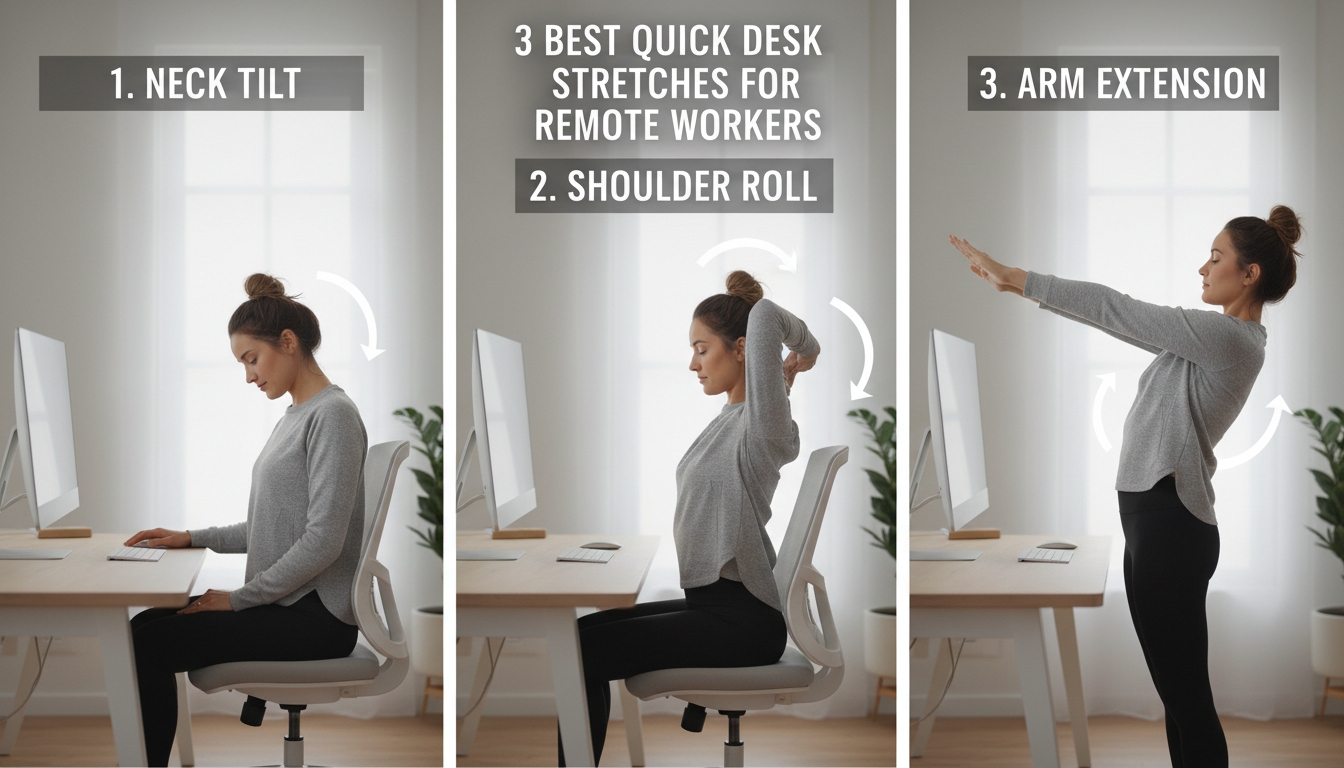
3 Best Quick Desk Stretches for Remote Workers
First, arrange your desk so the monitor sits at eye level, the keyboard and mouse are close enough to keep your elbows at a comfortable 90‑degree angle, and your chair supports your lower back with feet flat on the floor. Then try the neck‑and‑shoulder stretch: tilt your right ear toward your right shoulder for ten seconds, switch sides, and finish with a chin‑to‑chest pull while clasping your hands behind your head. Finally, do a seated twist: place your right hand on the chair back, inhale to lengthen, exhale to rotate right, hold 8‑10 seconds, then repeat left. Keep these moves in your routine and you’ll discover even more ways to stay comfortable and productive.
Table of Contents
Set Up Your Desk for Safe Stretching
A well‑arranged workspace is the foundation for safe, effective stretching. Start by positioning your monitor at eye level; you should be able to glance straight ahead without tilting your head. Keep your keyboard and mouse close enough that your elbows stay at a comfortable 90‑degree angle, reducing shoulder strain. Use a chair that supports your lower back, and adjust its height so your feet rest flat on the floor or on a footrest. Clear any clutter from the area around your desk to give yourself room to extend arms or shift weight without bumping into objects. If you work on a laptop, add a separate stand or riser to achieve the same ergonomic height as a desktop monitor. Finally, ensure adequate lighting to avoid squinting, which can tense neck muscles. These simple adjustments create a stable, ergonomic zone that lets you stretch confidently throughout the day.
Office Stretch: Neck & Shoulders in 30 Seconds
Ever feel tension building in your neck and shoulders after hours at the screen? Sit upright, shoulders relaxed, and let’s melt that stress in 30 seconds.
First, drop your right ear toward your right shoulder; hold for ten seconds, feeling a gentle stretch along the left side of your neck. Switch sides, ear to left shoulder, another ten seconds.
Next, clasp both hands behind your head, elbows wide. Gently press your chin toward your chest while pulling your elbows forward, creating a subtle compression between the shoulder blades. Hold for ten seconds, breathing deeply.
Release, roll your shoulders backward three times, then forward three times to restore mobility. This quick routine re‑aligns your posture, eases tightness, and boosts circulation without leaving your desk. Do it whenever you notice stiffness, and you’ll keep your neck and shoulders limber throughout the workday.
Office Stretch: Seated Twist to Activate Core
Feeling stiff in your core after long hours of sitting? The seated twist reactivates those deep muscles while you stay at your desk. Sit upright, feet flat, and place your right hand on the back of your chair. Inhale, lengthen your spine, then exhale and gently rotate your torso to the right, looking over your shoulder. Keep hips square and avoid forcing the stretch; you should feel a mild tension along your left side. Hold for 8‑10 seconds, then return to center. Switch to the left side, mirroring the movement. Perform three cycles per side, breathing steadily throughout. This twist mobilizes the thoracic spine, engages the obliques, and improves digestion after prolonged sitting. It’s quick, requires no equipment, and can be done between meetings. Consistent practice will reduce stiffness, enhance posture, and keep your core ready for the next task.
Frequently Asked Questions
How Often Should I Stretch During a Typical Workday?
You should stretch every 60‑90 minutes, aiming for 2‑3 brief sessions per hour. Stand, roll shoulders, and stretch neck or wrists; this keeps circulation flowing and prevents stiffness throughout the workday.
Can These Stretches Help Prevent Carpal Tunnel Syndrome?
Yes, they can reduce tension in your wrists and forearms, improving circulation and flexibility, which helps lower carpal tunnel risk. Consistently incorporating those stretches throughout your day strengthens supportive muscles.
Are There Any Modifications for People With Limited Mobility?
Yes, you can adapt each stretch—use a smaller range of motion, replace standing twists with seated rotations, and swap arm circles for gentle shoulder shrugs, ensuring you stay within comfort limits.
Do I Need Any Equipment to Perform These Desk Stretches?
You don’t need any special equipment—just a chair, your desk, and maybe a water bottle for grip. Use your body weight, a towel, or a light resistance band if you want extra stretch.
How Long After a Stretch Should I Resume Typing?
You should wait about 30 seconds to a minute after each stretch before you start typing again, letting your muscles settle and blood flow normalize, so the benefits linger and strain doesn’t return.
Conclusion
Incorporating these quick stretches into your daily routine keeps your muscles loose, improves posture, and boosts energy without stealing work time. By setting up a safe stretch zone, easing neck and shoulder tension in just 30 seconds, and adding a seated twist to fire up your core, you’ll feel more comfortable and focused throughout the day. Keep moving, stay consistent, and let your desk become a place of both productivity and well‑being.


Sorry, the comment form is closed at this time.